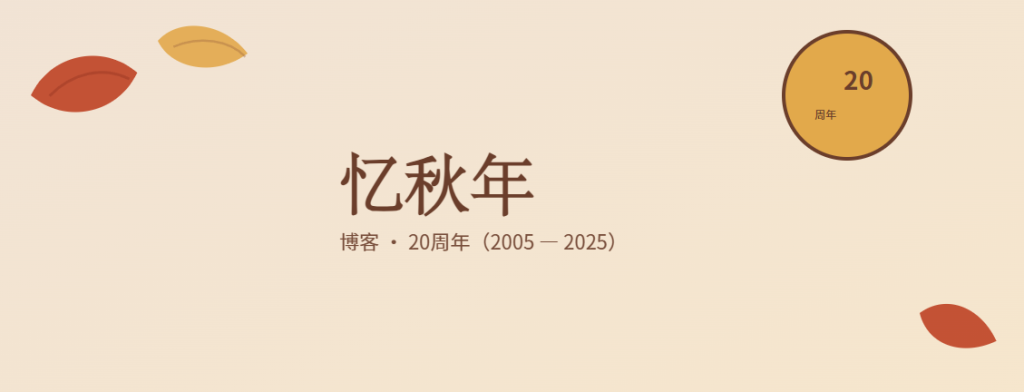
好的。下面是已解码并略作小幅修正(移除可能导致兼容性问题的滤镜)的 SVG 源码。直接复制全部内容到一个文本文件,保存为 banner.svg 即可在浏览器或矢量编辑器中打开/导出为 PNG。
使用提示:
– 在不同系统上,SVG 会用系统字体回退;若需固定外观,建议在矢量编辑器中替换为你偏好的中文字体(例如:思源宋体/思源黑体等),并导出为 PNG。
– 若要修改年份、文字、颜色或尺寸,告诉我你要的改动,我可以帮你直接修改并返回新的 SVG。
<?xml version=”1.0″ encoding=”UTF-8″?>
<svg xmlns=”http://www.w3.org/2000/svg” width=”1200″ height=”500″ viewBox=”0 0 1200 500″>
<!– 背景渐变 –>
<defs>
<linearGradient id=”g” x1=”0″ x2=”1″ y1=”0″ y2=”1″>
<stop offset=”0″ stop-color=”#F6E8D9″/>
<stop offset=”1″ stop-color=”#FBEBD0″/>
</linearGradient>
</defs>
<rect width=”1200″ height=”500″ fill=”url(#g)”/>
<!– 轻微纸张质感(透明矩形模拟) –>
<rect width=”1200″ height=”500″ fill=”#000″ opacity=”0.02″/>
<!– 左侧装饰:大叶子(简化形状) –>
<g transform=”translate(80,120) rotate(-12)” fill=”#C14A2C” opacity=”0.95″>
<path d=”M0 0 C30 -40, 90 -40, 120 0 C90 40, 30 40, 0 0 Z”/>
<path d=”M20 5 C50 -15, 85 -15, 110 5″ stroke=”#8B2917″ stroke-width=”3″ fill=”none” opacity=”0.4″/>
</g>
<g transform=”translate(220,60) rotate(8)” fill=”#E2A94B” opacity=”0.9″>
<path d=”M0 0 C20 -30, 70 -30, 100 0 C70 30, 20 30, 0 0 Z”/>
<path d=”M18 4 C45 -12, 78 -12, 98 4″ stroke=”#8B4E2B” stroke-width=”2.5″ fill=”none” opacity=”0.35″/>
</g>
<!– 主标题 –>
<text x=”420″ y=”240″ font-family=”Noto Serif SC, ‘STSong’, ‘PingFang SC’, serif” font-size=”72″ fill=”#6B3E2B” font-weight=”700″>
忆秋年
</text>
<!– 副标题 –>
<text x=”420″ y=”290″ font-family=”‘PingFang SC’, ‘Noto Sans SC’, sans-serif” font-size=”22″ fill=”#6B3E2B” opacity=”0.9″>
博客 · 20周年(2005 — 2025)
</text>
<!– 右侧圆形徽章 –>
<g transform=”translate(980,120)”>
<circle cx=”0″ cy=”0″ r=”70″ fill=”#E2A94B” stroke=”#6B3E2B” stroke-width=”4″ />
<text x=”-4″ y=”-6″ font-family=”‘PingFang SC’, ‘Noto Sans SC’, sans-serif” font-size=”28″ fill=”#6B3E2B” font-weight=”700″>20</text>
<text x=”-36″ y=”26″ font-family=”‘PingFang SC’, ‘Noto Sans SC’, sans-serif” font-size=”12″ fill=”#6B3E2B”>周年</text>
</g>
<!– 右下小枫叶作平衡 –>
<g transform=”translate(1060,360) rotate(20)” fill=”#C14A2C” opacity=”0.95″>
<path d=”M0 0 C20 -30, 60 -30, 90 0 C60 30, 20 30, 0 0 Z”/>
</g>
</svg>