速读仅需 1 分钟
👀
选项说明
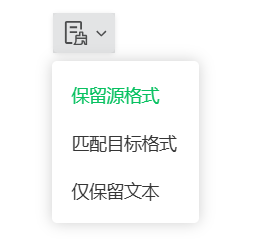
• 保留源格式:粘贴时保持原始文本的所有格式(字体、颜色、样式等)
• 匹配目标格式:粘贴时应用当前编辑区域的格式样式
• 仅保留文本:只粘贴纯文本内容,去除所有格式
比如以下截图就是公众号编辑器所提供的选项
👀
class TextPasteTool {constructor() {this.sourceText = '';this.targetText = '';this.selectedOption = 'source';this.sourceFormat = {};this.targetFormat = {};}// 获取选中的粘贴选项getSelectedOption() {const options = document.getElementsByName('pasteOption');for (let option of options) {if (option.checked) {return option.value;}}return 'source';}// 分析文本格式analyzeFormat(element) {const format = {fontFamily: window.getComputedStyle(element).fontFamily,fontSize: window.getComputedStyle(element).fontSize,fontWeight: window.getComputedStyle(element).fontWeight,fontStyle: window.getComputedStyle(element).fontStyle,color: window.getComputedStyle(element).color,backgroundColor: window.getComputedStyle(element).backgroundColor,textDecoration: window.getComputedStyle(element).textDecoration,lineHeight: window.getComputedStyle(element).lineHeight,textAlign: window.getComputedStyle(element).textAlign};// 分析HTML标签const html = element.innerHTML;const hasBold = /<b>|<strong>/.test(html);const hasItalic = /<i>|<em>/.test(html);const hasUnderline = /<u>/.test(html);const hasLinks = /<as+href/.test(html);const hasLists = /<ul>|<ol>|<li>/.test(html);const hasHeaders = /<h[1-6]>/.test(html);format.hasBold = hasBold;format.hasItalic = hasItalic;format.hasUnderline = hasUnderline;format.hasLinks = hasLinks;format.hasLists = hasLists;format.hasHeaders = hasHeaders;format.htmlTags = this.extractHtmlTags(html);return format;}// 提取HTML标签extractHtmlTags(html) {const tags = [];const tagRegex = /<(w+)([^>]*)>/g;let match;while ((match = tagRegex.exec(html)) !== null) {tags.push({name: match[1].toLowerCase(),attributes: match[2],fullTag: match[0]});}return tags;}// 获取纯文本内容getPlainText(element) {return element.textContent || element.innerText || '';}// 保留源格式粘贴pasteWithSourceFormat() {return this.sourceText;}// 匹配目标格式粘贴pasteWithTargetFormat() {const sourcePlainText = this.getPlainText(document.getElementById('sourceArea'));const targetElement = document.getElementById('targetArea');// 创建临时元素来应用目标格式const tempElement = document.createElement('div');tempElement.innerHTML = sourcePlainText;// 应用目标区域的样式const targetStyle = window.getComputedStyle(targetElement);tempElement.style.fontFamily = targetStyle.fontFamily;tempElement.style.fontSize = targetStyle.fontSize;tempElement.style.fontWeight = targetStyle.fontWeight;tempElement.style.fontStyle = targetStyle.fontStyle;tempElement.style.color = targetStyle.color;tempElement.style.backgroundColor = targetStyle.backgroundColor;tempElement.style.lineHeight = targetStyle.lineHeight;tempElement.style.textAlign = targetStyle.textAlign;return tempElement.innerHTML;}// 仅保留文本粘贴pasteTextOnly() {return this.getPlainText(document.getElementById('sourceArea'));}// 执行粘贴executePaste() {this.sourceText = document.getElementById('sourceArea').innerHTML;this.targetText = document.getElementById('targetArea').innerHTML;this.selectedOption = this.getSelectedOption();let result = '';switch (this.selectedOption) {case 'source':result = this.pasteWithSourceFormat();break;case 'target':result = this.pasteWithTargetFormat();break;case 'text':result = this.pasteTextOnly();break;default:result = this.pasteWithSourceFormat();}return result;}// 更新格式信息显示updateFormatInfo() {const sourceElement = document.getElementById('sourceArea');const targetElement = document.getElementById('targetArea');this.sourceFormat = this.analyzeFormat(sourceElement);this.targetFormat = this.analyzeFormat(targetElement);const sourceInfo = document.getElementById('sourceFormatInfo');const targetInfo = document.getElementById('targetFormatInfo');sourceInfo.innerHTML = this.formatInfoToString(this.sourceFormat, '源文本');targetInfo.innerHTML = this.formatInfoToString(this.targetFormat, '目标文本');}// 格式化信息显示formatInfoToString(format, prefix) {let info = `<strong>${prefix}格式信息:</strong><br>`;info += `字体: ${format.fontFamily} | 大小: ${format.fontSize} | 颜色: ${format.color}<br>`;if (format.hasBold) info += '包含粗体 | ';if (format.hasItalic) info += '包含斜体 | ';if (format.hasUnderline) info += '包含下划线 | ';if (format.hasLinks) info += '包含链接 | ';if (format.hasLists) info += '包含列表 | ';if (format.hasHeaders) info += '包含标题 | ';info += `HTML标签: ${format.htmlTags.length}个`;return info;}}
功能特点
🎯 三种粘贴模式
支持保留源格式、匹配目标格式、仅保留文本三种不同的粘贴选项,满足不同场景需求。
📊 实时格式分析
自动分析源文本和目标文本的格式信息,包括字体、颜色、样式等,帮助用户了解文本格式。
🎨 智能格式匹配
根据选择的粘贴选项,智能应用相应的格式规则,确保输出结果符合预期。
📋 一键复制结果
提供便捷的复制功能,快速将处理后的文本内容复制到剪贴板,提高工作效率。
📱 响应式设计
支持桌面和移动设备,界面自适应不同屏幕尺寸,提供良好的用户体验。
🔧 简单易用
界面简洁直观,操作简单,无需复杂设置,即可快速处理文本格式。
使用场景
📄 文档格式统一化
将不同来源的文档内容统一为相同的格式样式,保持文档的一致性。
🔄 跨平台文本转换
在不同平台和编辑器之间转换文本格式,确保内容在不同环境中的兼容性。
✏️ 富文本编辑器处理
处理富文本编辑器中的内容,调整格式样式,优化显示效果。
💻 代码注释格式调整
统一代码注释的格式样式,提高代码的可读性和维护性。
📧 邮件内容格式优化
优化邮件内容的格式,确保在不同邮件客户端中显示正常。
📝 内容管理系统
在内容管理系统中处理用户输入的内容,统一格式标准。